Guide · Last updated: 2026-10-12
Android crash reporting without Crashlytics
Capture Kotlin/JVM crashes in Android apps without Firebase: Bugdone.configure, enableCrashCapture, environments and limits (no NDK, no ANR).
Language: Deutsch
Firebase Crashlytics is the default on Android — for good reason (see the comparison). But not every project wants a Firebase project, Google dependencies or data processing outside the EU. For JVM crashes in Kotlin and Java code, the lean bugd.one Android SDK is enough: one UncaughtExceptionHandler, a file buffer and an HTTPS call.
Prerequisites
- A bugd.one project and its publishable key (
bk_live_…) from Project → Settings. It can safely live in the app. - Android minSdk 21 or higher, Kotlin 1.9+.
- The bugd.one Android SDK as source code (Gradle module). It is not published on Maven Central. Without the SDK, use REST, see below.
Step by step
Step 1: Add the SDK as a Gradle module
Copy the SDK folder into your project as bugdone/ and include it:
// settings.gradle.kts
include(":bugdone")

// app/build.gradle.kts
dependencies {
    implementation(project(":bugdone"))
}
If your root project already declares the Android and Kotlin plugins, remove their version declarations in bugdone/build.gradle.kts.
Step 2: Enable it in your Application class
// MyApplication.kt
import android.app.Application
import one.bugd.Bugdone
import one.bugd.enableCrashCapture

class MyApplication : Application() {
    override fun onCreate() {
        super.onCreate()
        Bugdone.configure(
            projectKey = "bk_live_YOUR_PROJECT_KEY",
            // environment = "staging",  // otherwise automatic: debuggable → development
        )
        Bugdone.enableCrashCapture(this, release = BuildConfig.VERSION_NAME)
    }
}
Register the class in the manifest if you have not already:
<application android:name=".MyApplication" … >enableCrashCapture installs a Thread.setDefaultUncaughtExceptionHandler. On a crash the SDK builds the payload (type, message, stack trace, release, environment, device, thread name), appends it to the file bugdone-pending-crashes.json in the cache directory (at most 50 entries) and then calls the previous handler — so the normal crash dialog and the Logcat output are preserved. On the next start the SDK sends the stored crashes in the background. If sending fails (for example when offline), they stay for the next attempt.
Step 3: Report caught exceptions
import one.bugd.Bugdone
import one.bugd.captureException
import one.bugd.captureMessage

try {
    paymentClient.charge(order)
} catch (e: IOException) {
    Bugdone.captureException(e, mapOf("feature" to "checkout", "orderItems" to order.items.size))
    showRetry()
}

Bugdone.captureMessage("Unexpected state: cart empty")
Manual reports are sent in the background right away; if that fails they also end up in the file buffer.
Step 4: Combine with Crashlytics or other handlers
The SDK remembers the handler that was already installed and calls it after saving. If you want to run both tools in parallel (for example during a migration), initialize bugd.one after the other tool.
Step 5: Test it
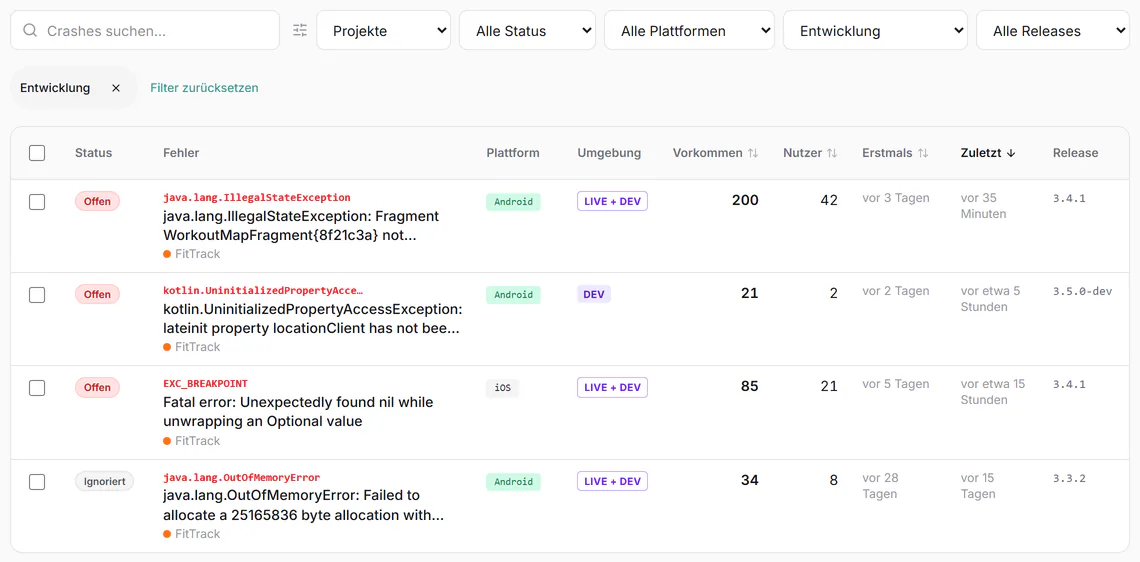
In a test build trigger a crash (throw IllegalStateException("Test crash") in a button handler), let the app crash and restart it. The stored crash is only sent on restart. Debug builds appear with the environment development and a DEV marker.
Step 6: Environments and notifications
By default, a debuggable app (ApplicationInfo.FLAG_DEBUGGABLE, i.e. normal debug builds) means development, otherwise production. For a staging flavor, set the value yourself:
Bugdone.configure(
    projectKey = "bk_live_YOUR_PROJECT_KEY",
    environment = if (BuildConfig.FLAVOR == "staging") "staging" else null, // null = automatic
)
Non-production events trigger no emails, webhooks or Slack/Discord/Teams messages. A new crash type in production reaches you by email and — if enabled — by web push. Use the project's development mode while the app is not released yet.
What gets captured
| Field | Content |
|---|---|
| Message, type | throwable.message (max. 2,000 characters), simple class name |
| Stack trace | Log.getStackTraceString(throwable), max. 50,000 characters, including “Caused by” |
| Platform | android |
| Device | e.g. Android 15 (SDK 35) · Google Pixel 9 — version and model, no device ID |
| Release, environment | release parameter, FLAG_DEBUGGABLE or your value |
| Context | thread name and your own context |
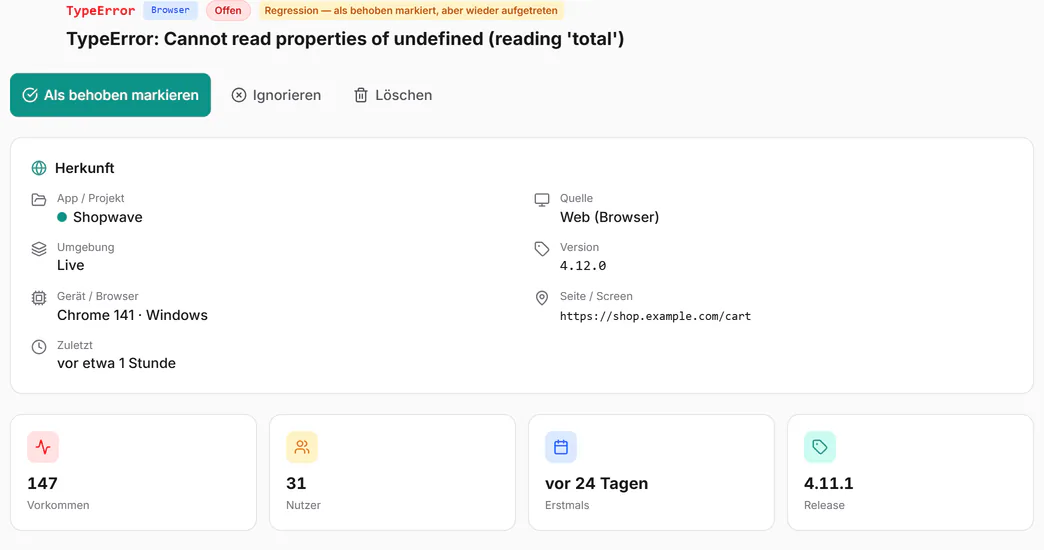
Identical crashes are grouped by a fingerprint; you see occurrences, first/last seen, release and environment. If a crash marked as fixed shows up again, bugd.one reopens it as a regression.
Limits and notes
If you need NDK crashes, ANR detection or mapping upload, a specialized tool such as Firebase Crashlytics or Sentry is the better choice — more in the Crashlytics comparison.
Without the SDK: plain REST
You can also send caught exceptions without the SDK. For fatal crashes you have to store the payload first — like the SDK does — and send it on the next start.
import org.json.JSONObject
import java.net.HttpURLConnection
import java.net.URL
import kotlin.concurrent.thread

fun reportToBugdone(e: Throwable, release: String) = thread {
    val body = JSONObject()
        .put("message", (e.message ?: e.javaClass.simpleName).take(2000))
        .put("stack", android.util.Log.getStackTraceString(e).take(50_000))
        .put("type", e.javaClass.simpleName)
        .put("platform", "android")
        .put("release", release)
        .put("environment", if (BuildConfig.DEBUG) "development" else "production")
    val conn = URL("https://bugd.one/api/v1/crashes").openConnection() as HttpURLConnection
    try {
        conn.requestMethod = "POST"
        conn.doOutput = true
        conn.setRequestProperty("Content-Type", "application/json")
        conn.setRequestProperty("X-API-Key", "bk_live_YOUR_PROJECT_KEY")
        conn.outputStream.use { it.write(body.toString().toByteArray()) }
        conn.responseCode // 201 = stored, 429 = quota exhausted
    } catch (_: Exception) {
        // offline: drop or buffer locally
    } finally {
        conn.disconnect()
    }
}
All fields and error codes are in the API reference and the OpenAPI specification.
Further reading
- Crash reporting in the documentation
- Send bug reports via REST API: users report problems from your app and see the progress
- Mobile integration: the
/embedform in a Custom Tab or WebView
Frequently asked questions
- Why does the crash only show up on the next app start?
- A crashing process has no time for network calls. The SDK therefore writes the crash to the app's cache and sends it on the next start, as soon as enableCrashCapture is called.
- Does the SDK capture ANRs or NDK crashes?
- No. It captures uncaught JVM exceptions (Kotlin/Java). ANRs (“App Not Responding”) and crashes in native C/C++ code (NDK) are not captured.
- Can I run bugd.one alongside Crashlytics?
- Yes. After saving, the SDK calls the previously installed UncaughtExceptionHandler. Initialize bugd.one after Crashlytics and both receive the crash.
- Are stack traces obfuscated by R8/ProGuard deobfuscated?
- No. bugd.one does not apply ProGuard/R8 mapping files. Obfuscated class and method names stay obfuscated in the dashboard.
- Do I need Google Play Services?
- No. The SDK only uses Android built-ins (HttpURLConnection, org.json) and sends over HTTPS straight to bugd.one.
Related guides
- bugd.one vs. Firebase Crashlytics: comparison — An objective comparison of bugd.one and Firebase Crashlytics: cost, data processing, native crashes, platforms and user feedback — with sources, as of October 2026.
- Flutter crash reporting without Firebase — Capture, group and get notified about Dart and Flutter errors automatically — with the bugd.one Flutter SDK, EU-hosted, no Firebase project needed.
- Send bug reports from your own app via REST API — Your own report form, bugd.one as the backend: send reports via POST, store the reporter token, fetch status and replies, badge counts via status batch.
Up and running in two minutes
Create an account, add a project, paste your key — all Pro features free for 7 days, no credit card required.